How to Animate Posters for Social Media to Stop the Scroll
Learn how to turn static posters into eye-catching 5-15 second animated clips for social media using Aificient Studio's dedicated Poster mode.
 SabinoCEO5 min readUpdated
On this page
If you are promoting an event, a product launch, or a new piece of content, you likely rely on a standard digital poster. However, on platforms driven by vertical video feeds, static images are at a severe disadvantage. Algorithms prioritize watch time and movement, meaning a standard graphic often gets scrolled past before the viewer even reads the headline. To capture attention, you need motion.
Animating a poster traditionally requires complex motion graphics software, separating layers, and manually keyframing elements. Now, you can automate this process. Using the AI poster design tools in Aificient Studio, you can turn a static image into a seamless 5 to 15-second animated clip where the environment breathes, the lighting shifts, and your core message stays perfectly readable.
Why Animated Posters Outperform Static Graphics
The primary goal of any social media asset is to interrupt the user's scroll. Motion creates an immediate visual hook. When a user sees a background subtly shifting or light rays moving across a scene, their eyes naturally linger to process the movement. This extra second of attention is often all it takes for them to read your event date, product name, or call to action.
Animated posters also allow you to tap into video-exclusive features on social platforms, such as trending audio tracks. While a static image sits silently on a timeline, an animated clip can be paired with ambient sound or popular music, making it eligible for algorithmic discovery through audio trends.
Approach 1: Animating an Existing Poster
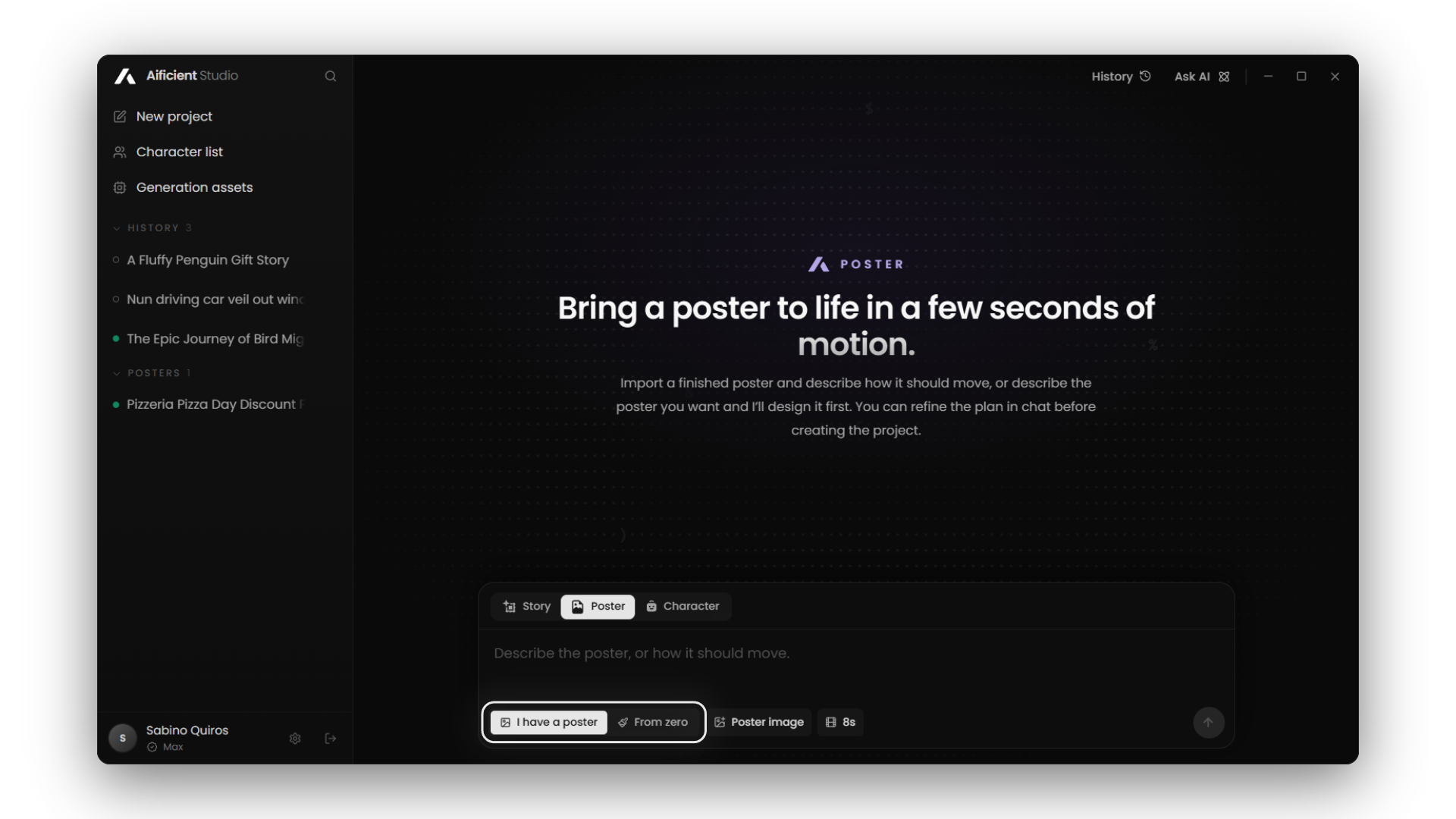
If you already have finished artwork from a designer, you do not need to rebuild it to add motion. Aificient Studio includes a dedicated "I have a poster" pipeline designed specifically for completed assets.
When you upload your finished artwork, the AI analyzes the composition to separate the structural information from the environmental details. It keeps your original aspect ratio intact. More importantly, it understands what should move and what should not.
- Typography stays put: Your headlines, dates, and body copy remain sharp and static, ensuring the poster remains entirely legible.
- Logos remain anchored: Brand assets will not warp, drift, or distort during the animation.
- Environments come to life: The photography, background elements, and lighting shift dynamically, creating a cinematic loop.
This mode requires zero prompt engineering. You simply upload the file, and the video model generates a 5 to 15-second ambient clip based on the visual context of your design.
Approach 2: Designing and Animating "From Zero"
If you are starting with just an idea, Aificient Studio's "From zero" pipeline allows you to generate the poster design and its animation in one unified workflow. Instead of uploading a finished file, you describe what you want the poster to communicate.
Before spending any compute time generating the final video, the chat interface returns an editable poster plan. This allows you to review the concept, adjust the visual style, and ensure the messaging aligns with your campaign before the project is created.
Guiding the Design with References
To keep the generated poster on-brand, you can supply up to 5 reference images. If you are building a consistent brand presence, you can also pin up to 3 reusable characters from your Character library. Note that references and pinned characters share a single budget of 5 items per poster.
Choosing the Right Aspect Ratio
Unlike standard video generation which is typically locked to 16:9 or 9:16, the "From zero" poster mode supports 9:16, 3:4, 1:1, 4:3, and 16:9. For modern social media feeds like TikTok, 9:16 is the optimal choice, taking up the entire mobile screen to maximize impact.
Rendering Your Animated Poster
Once your poster is ready to be animated, Aificient Studio gives you complete control over how the file is rendered. If you are using the desktop app and have a capable graphics card, you can render the animation locally on your own GPU at no extra cost. The application also supports rendering on rented GPU instances using your own Vast.ai key, allowing you to select profiles like the RTX 4090 or A100.
If you do not have a powerful computer, you can render the poster using Aificient Cloud. Cloud rendering requires an active subscription and is billed in credits, offering both Lite and Pro quality tiers. The Lite tier is faster, while the Pro tier requires more compute but delivers the highest possible visual fidelity.
Publishing Directly to Your Audience
The final step is getting the animated poster onto your feed. Instead of exporting the file and transferring it to your phone, the Aificient desktop app allows you to publish straight to TikTok from inside the software.
You can connect one or several TikTok accounts. From the publish dialog, you can generate an AI caption in your saved tone, attach trending hashtags, and even pick the cover frame. If you want to leverage audio trends, you can attach a real trending sound from TikTok's catalogue directly in the app. You can choose to publish immediately or schedule the post for at least 20 minutes in the future. The upload process continues seamlessly in the background, even if you close the publish window.
Your move
Write the idea. Post the video.
One written line becomes a finished, original short — scripted, cast, voiced, and rendered — ready to post to TikTok, Reels & Shorts.
 A lone samurai leads the charge at dawn — cinematic, photoreal.